
Newton & Bolt
Newton & Bolt is a stealth platformer in which the player takes on the role of a rebel robot who wants to help a dog escape from a city under surveillance.

Main Task
-
Create 2D plans
-
Create blocking layout
-
Place enemies and adjust their settings based on the areas
-
Make the path obvious
-
Supervise playtest sessions and communicate results
-
Adjust the levels based on the feedback received
-
Level dressing

Introduce the player to the mechanics
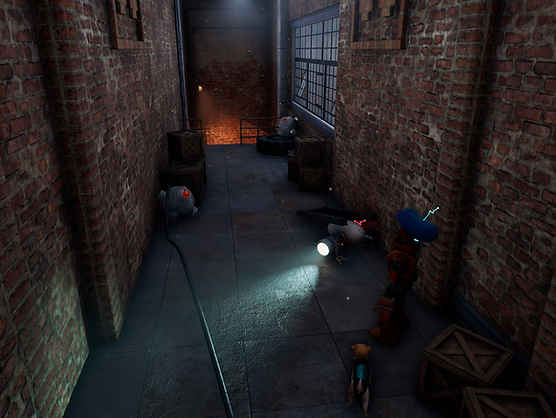
The first area is designed to set the scene for the player through a cutscene and to teach them that they can attach themselves to certain metal surfaces using their magnetic feet.
Next, the player will walk through a corridor where a damaged enemy robot is located. The robot’s indicator light will turn red and the controller will vibrate, suggesting that the robots are dangerous and that the player may eventually have to deal with them.
To help players learn the controls, tips appear when they encounter the mechanics for the first time.


To increase the difficulty curve, we’ve added a new type of enemy in the final level. This enemy moves on the ground and is faster than the player. The same detection cone is used to indicate the area within which it can detect the player.
During the first encounter with this enemy, it is alone and circles around a stack of boxes. A respawn point is located just before this new confrontation. The player can therefore test this new enemy and learn how it behaves without too much pressure.
Guide the player
In a steampunk world, metal is everywhere. To let the player know which metal objects they can magnetize, the same assets are reused, accompanied by a visual electricity effect, thereby distinguishing them from other non-magnetized metal objects.
Since the game takes place at night, lighting plays a crucial role. First, it is used to clearly highlight the path forward and potential hiding spots. Second, green lighting, chosen for its strong contrast with the rest of the environment, is used to draw the player's attention to important objectives and checkpoints.


Upon entering the final level, the player immediately sees the clock tower overlooking the train station, which serves as a landmark throughout the area. This provides a clear visual objective and allows the player to gauge their progress as they move closer to their destination.
The train tracks also lead toward the station, naturally guiding the player in the right direction.
To introduce verticality, we added floating platforms to the level. However, these platforms were often outside the player's field of view. To encourage players to look upward and notice them, we added sound effects that draw attention to their presence.
Design behind each zone


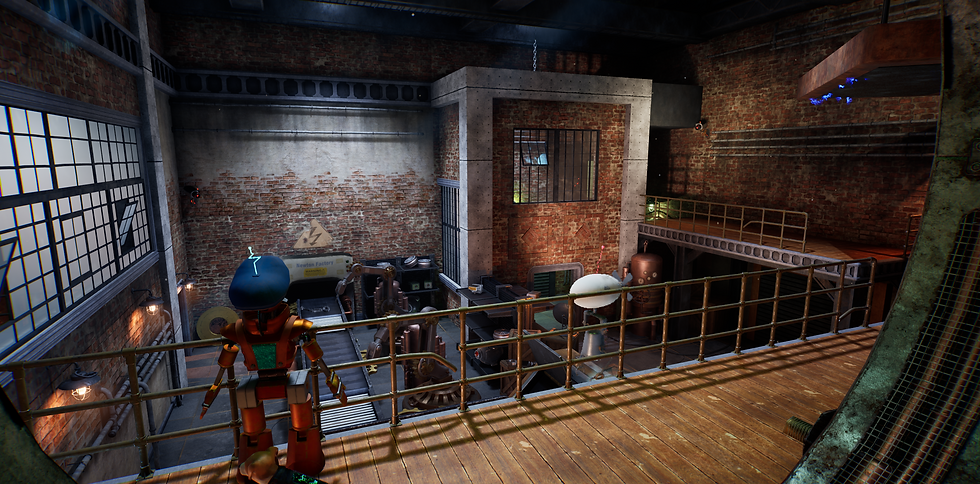
The factory
The interior of the factory serves as the tutorial area. Its main purposes are to set the scene for the player through level art and the introductory cutscene, as well as to teach them the game mechanics.
The city
When the player exits the factory, they are greeted by a panoramic view of the city. This significantly larger area makes greater use of verticality, offering a more complex environment to navigate. The player is challenged by intricate traversal paths and faster enemies.
Enemy density is also increased, with patrols covering large sections of the level. As a result, the windows of opportunity to complete the courses are much shorter, requiring players to carefully observe their surroundings and plan their movements before taking action.


The train station (Exterior)


The train station is the largest level in the game. The clock tower remains visible from multiple locations throughout the environment, serving as a landmark that guides players toward their objective. As the final destination, the train station symbolizes escape and freedom.
This level features a well-balanced difficulty curve. It introduces a new ground-based enemy type, increasing the challenge and requiring players to adapt their strategies.
To further expand the magnetism mechanic and create more engaging traversal sequences, I introduced moving platforms that rotate or translate through the environment. These dynamic elements add complexity to navigation and encourage players to make greater use of the mechanic.
The train station (Interior)
To introduce a new challenge, I gave the flying enemies a unique role in this level. At the train station, they patrol outside the building and periodically pass by the windows, creating additional threats for the player to monitor.
As a result, players must advance cautiously, balancing their attention between the flying enemies visible through the windows and the ground-based enemies patrolling the station. This creates a greater sense of tension and encourages players to remain aware of threats coming from multiple directions.


Crédits
Isabelle Bélanger - Concept Artist
Darrhyl Veloury Rousseau - Character Artist, FX Artist, Musical Composer
Shaya Séguin - Character Artist

Maina Bernier - Character Artist
Heiva Martin - Rigging artist, Thecnical Artist
Catherine Champeval - Rigging artist, Environment Artist
Jérémy Brosseau - 3D Animator
Jayke Dalbec - 3D Animator
Mathieu Stevens - 3D Animator
Dalinda Soria - 3D Animator
Audrey Lécuyer - Level Designer, Level Artist
Rose Boily - Environment Artist
Kerold Ashlyn Pierre - Environment Artist, Lighting Artist, Thecnical Artist
William Pak - Environment Artist, Texture Artist
Yian Dubé - Environment Artist, Texture Artist

Catherine Bergeron - Gameplay, AI, UI Programmer
Philippe St-Laurent-Recoura - Gameplay, UI, Audio Programmer
Zachary Meunier - Gameplay, UI Programmer
Willyam Dubé - Sound Designer

Pierre Tousignant - Professor
Kevin Lavigne-Bourque - Professor
Yannick Francillette - Professor